
AI Sales Email Generator: Write Personalized Outreach That Gets Replies
An AI email generator built for sales writes personalized cold and follow-up emails at scale by turning a short brief — or your prospect data — into ready-to-send copy. Instead of staring at a blank draft for every account on your list, a rep feeds the tool a role, a pain point, and a tone, and gets a usable first draft back in seconds.

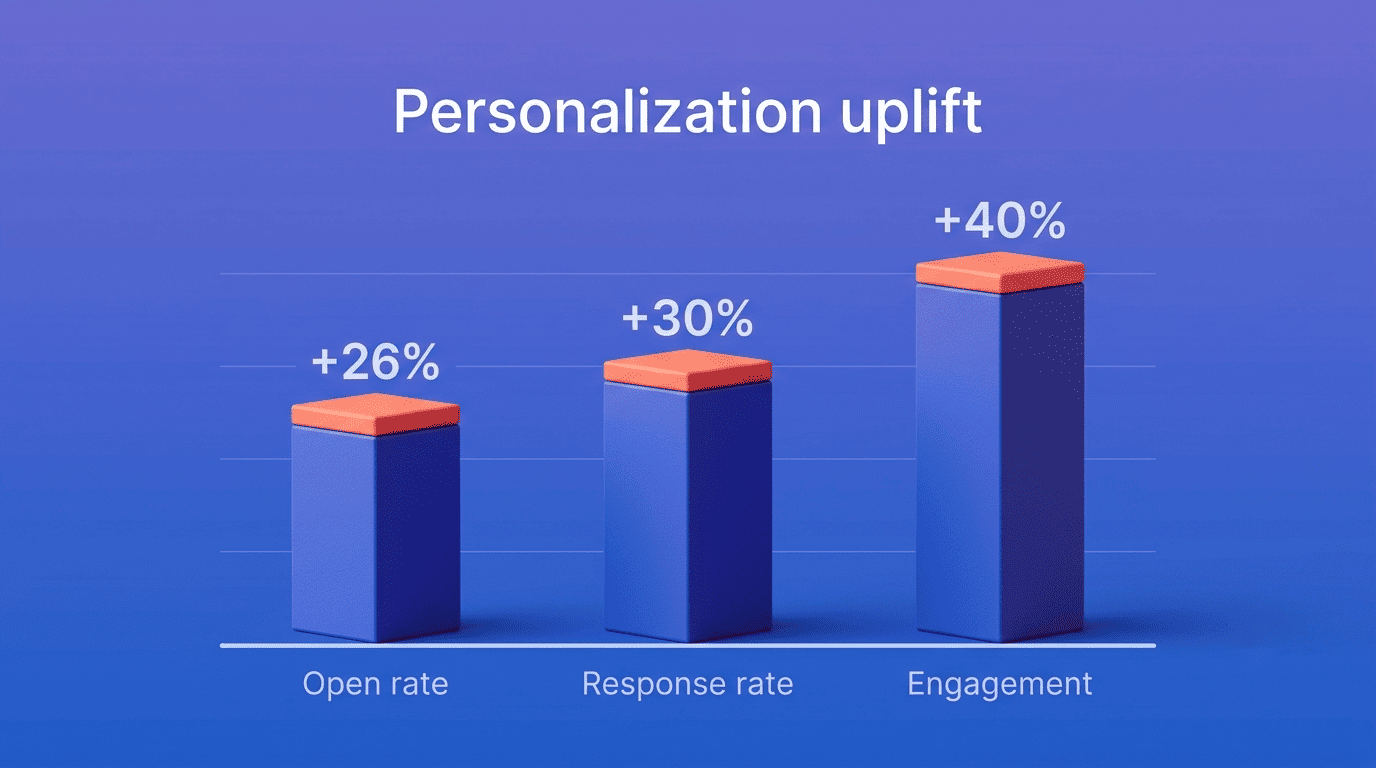
Traditional email writing eats roughly 21% of a sales rep’s workday — a figure cited by ZoomInfo from GTMnow’s sales-productivity research — and the average worker already receives about 117 emails a day per Microsoft’s Work Trend Index. Personalization is what cuts through that noise — done well, it can push response rates as high as 30%.
What Is an AI Sales Email Generator?
An AI sales email generator is a natural language processing (NLP) and machine learning tool that drafts cold outreach and follow-up copy from a prompt, a template, or live CRM and prospect data. Instead of manually writing each message, a rep describes the recipient and the goal, and the model produces a draft that’s edited and sent.
Who uses it and why
Sales development reps, account executives, business development teams, and B2B marketers are the core users. The goal is volume without sacrificing quality — writing dozens or hundreds of individually relevant emails a week instead of a handful of generic blasts. ZoomInfo found that 76% of sales teams using AI weekly report higher win rates, and 70% report bigger average deal sizes, which suggests the tool matters less than how consistently it’s used.
Generic generator vs. data-driven sales assistant
ZoomInfo splits these tools into three tiers: standalone writers that need data typed in by hand for a single email, sequence builders that plug into platforms like Outreach or Salesloft for outbound at scale, and assistants embedded directly inside a CRM. The distinction matters because output quality tracks input quality, not model sophistication.
AI output quality is determined by data quality, not model sophistication.— ZoomInfo, AI Sales Email Generators: A 2026 How-To Guide
That’s the core trade-off of this category: a sequence builder wired into CRM and prospect data will consistently out-personalize a standalone writer fed nothing but a job title, no matter which model sits underneath it.
How an AI Sales Email Generator Works
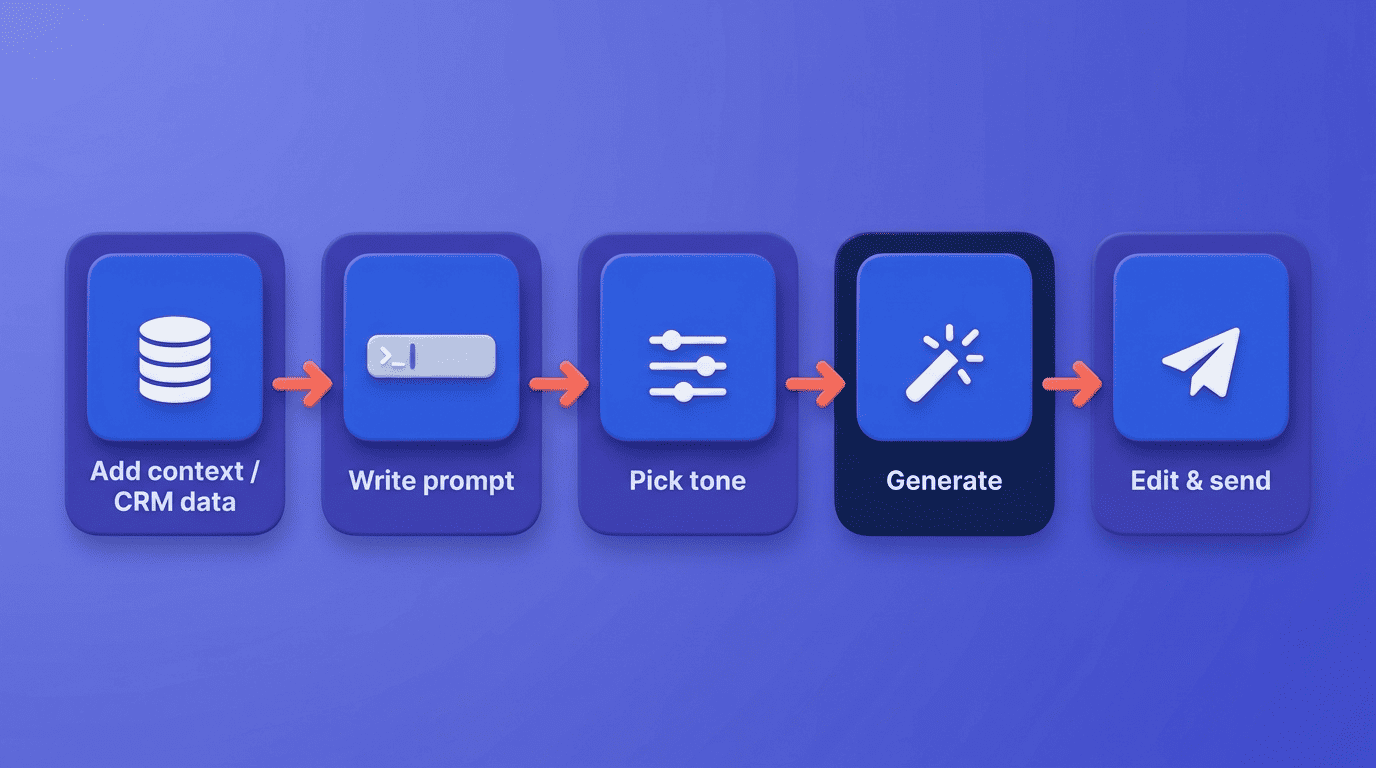
Most tools follow the same basic loop — you supply context, the model drafts, you edit and ship. The difference between tools is mainly how much of that context is pulled automatically from your CRM versus typed in by hand each time.
From brief (or data) to draft
The typical workflow runs in five steps:
- Give the tool context — either a short brief (role, industry, offer) or pull data directly from a prospect record.
- Write a prompt covering the recipient’s role, their likely pain point, and your offer.
- Choose a tone — formal, casual, consultative, urgent.
- Generate a draft.
- Edit the copy and paste it into your CRM or inbox.
QuillBot compresses this into three clicks — enter an idea, tweak the tone, copy to your CRM — while HubSpot’s version walks through five steps from input details to a refined, ready-to-send draft. Copy.ai can also seed a draft directly from a prospect’s LinkedIn profile, skipping the manual-brief step entirely.
Personalization at scale from your data
monday.com describes this as «personalization at scale» — the AI analyzes CRM data and writes uniquely worded emails to hundreds of prospects in one pass, rather than one merge-tag template. The data feeding that process usually falls into a few categories:
- Firmographics — company size, industry, headcount.
- Behavioral signals — site visits, content downloads, webinar attendance.
- Relationship history — past deals, support tickets, prior touches.
- Engagement patterns — email opens, reply timing, meeting no-shows.
- Buying signals — a funding round, a hiring spree, a leadership change.
Gartner’s research on active personalization found it can lift purchase completion by as much as 2.3x compared to passive, generic outreach.
Types of Sales Emails You Can Generate
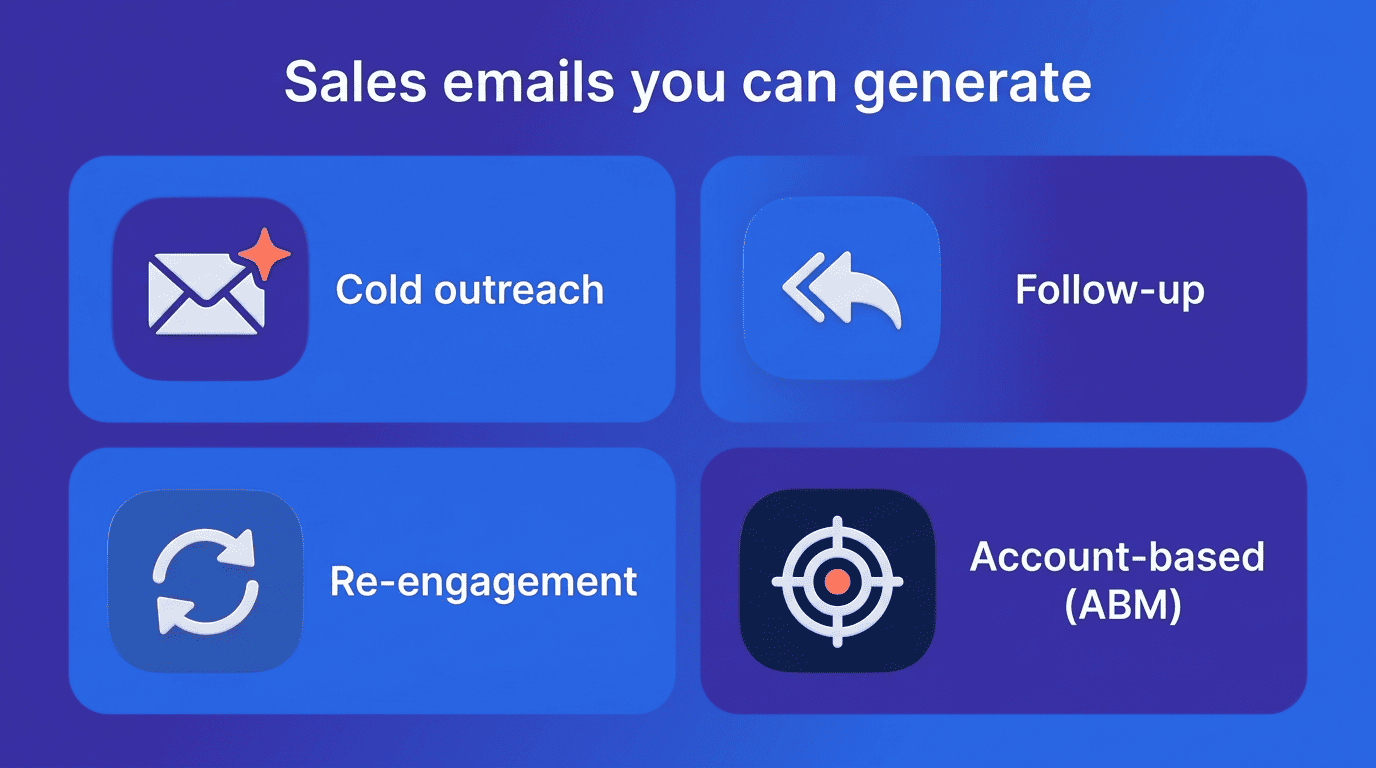
An AI email generator tool isn’t limited to first-touch cold outreach — most platforms cover the full lifecycle of a deal, from the first message to the renewal conversation.
Cold outreach and prospecting
Cold outreach is the first message to a prospect who hasn’t engaged yet, and it works best anchored to a trigger event — a funding round, a new hire in a relevant role, or a product launch. Copy.ai’s LinkedIn-profile seeding is built specifically for this use case, pulling enough context to avoid a generic opener.
Follow-ups, re-engagement, and account-based
Follow-up emails respond to a specific action. A prospect opened a proposal but didn’t reply, or attended a demo and went quiet — the follow-up references that exact behavior rather than restating the original pitch.
Re-engagement emails revive stalled deals. These target accounts that went cold weeks or months ago, usually with a new angle or a recent company update as the hook.
Account-based emails coordinate multiple stakeholders. For larger deals, the same offer gets tailored separately to a champion, a budget holder, and a technical evaluator within one account.
monday.com lists lead nurturing, re-engagement, event promotion, and upsell/cross-sell as the other recurring use cases its customers generate emails for.
Writing Copy That Converts: Tone, Subject Lines, and CTAs
A well-personalized email still fails if the subject line doesn’t earn an open or the body doesn’t point to one clear next step.
Subject lines and personalization
Personalized subject lines lift open rates by roughly 26%, and personalized promotional emails have been shown to drive around 41% higher click rates than generic copy. The practical takeaway is simple: reference a specific, real detail — a trigger event, a mutual connection, a recent company milestone — instead of a generic opener like «Quick question.»
One clear CTA + A/B testing
HubSpot’s generator inserts a call to action automatically so reps don’t forget one, and QuillBot offers A/B variants to compare against each other. Every email should carry exactly one clear next step — book a call, reply with availability, confirm interest — rather than three competing asks. Generating two or three subject-line or CTA variants and testing them against a segment is faster than guessing which phrasing will land.
| Element | Weak version | Personalized version |
|---|---|---|
| Subject line | «Quick question» | References a specific trigger event or role |
| Opener | Generic company pitch | Names the prospect’s actual pain point |
| CTA | Multiple asks in one email | One clear next step |
| Data source | None / guessed | CRM + firmographic + behavioral signals |
Deliverability and Compliance (Don’t Skip This)
Copy that converts is worthless if it never reaches the inbox, and even a perfectly delivered email can create legal exposure if it skips basic disclosure rules.
Keep your domain healthy
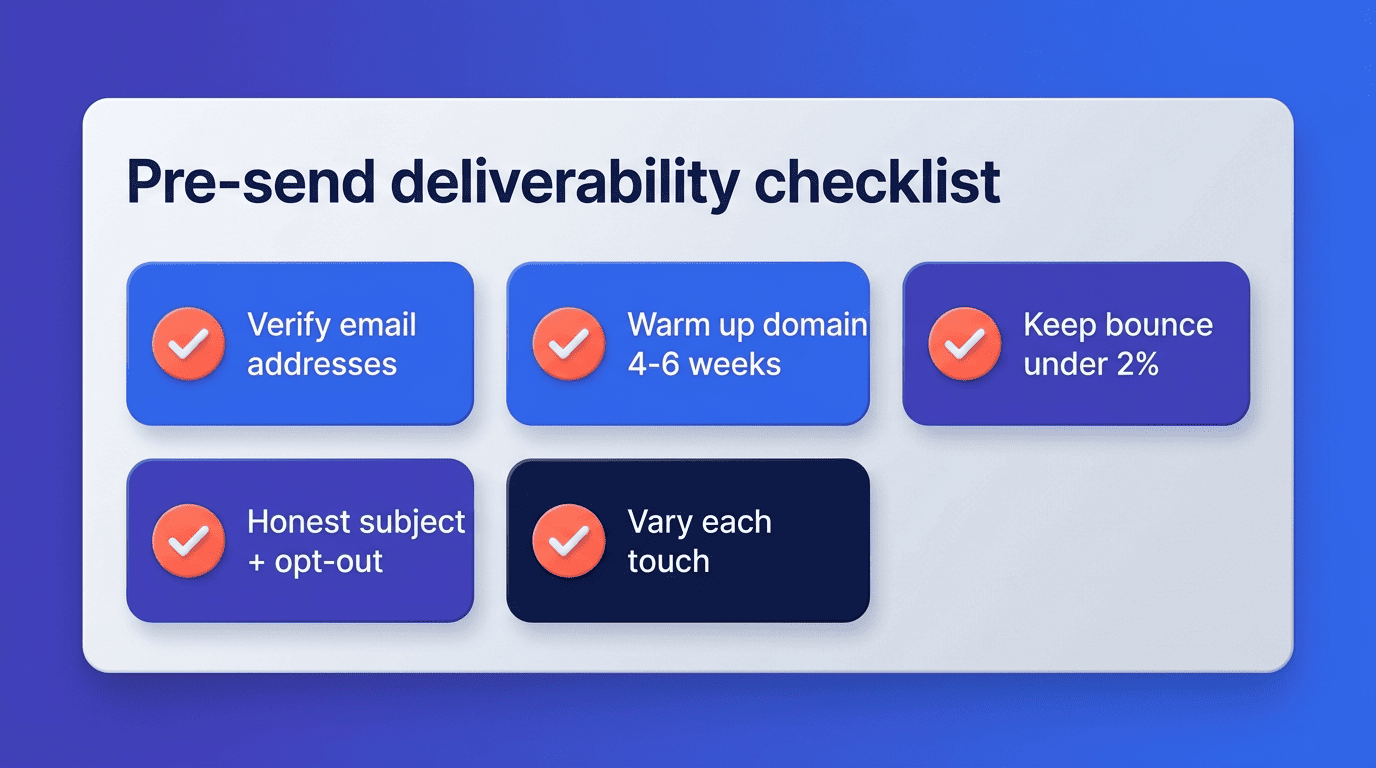
Verify email addresses before you generate copy for them — a stale list wastes both the AI’s context and your sending reputation. New or repurposed sending domains typically need four to six weeks of gradual warm-up before running full-volume campaigns, and a bounce rate above 2% signals a domain problem serious enough to pause outreach. Varying the angle and structure of each touch, rather than reusing one template, also reduces the chance spam filters start pattern-matching your sequence.
Stay legal: CAN-SPAM and GDPR
US-based outreach must comply with the CAN-SPAM Act — an honest subject line, a valid physical postal address, and a working opt-out mechanism are legal requirements, not best practices. The FTC’s CAN-SPAM Act Compliance Guide lays out the specific obligations for commercial email senders. Emailing contacts in the EU adds GDPR’s requirement for a lawful basis to process their data. None of this is something the AI checks for you — using a generator doesn’t shift legal responsibility away from the sender.
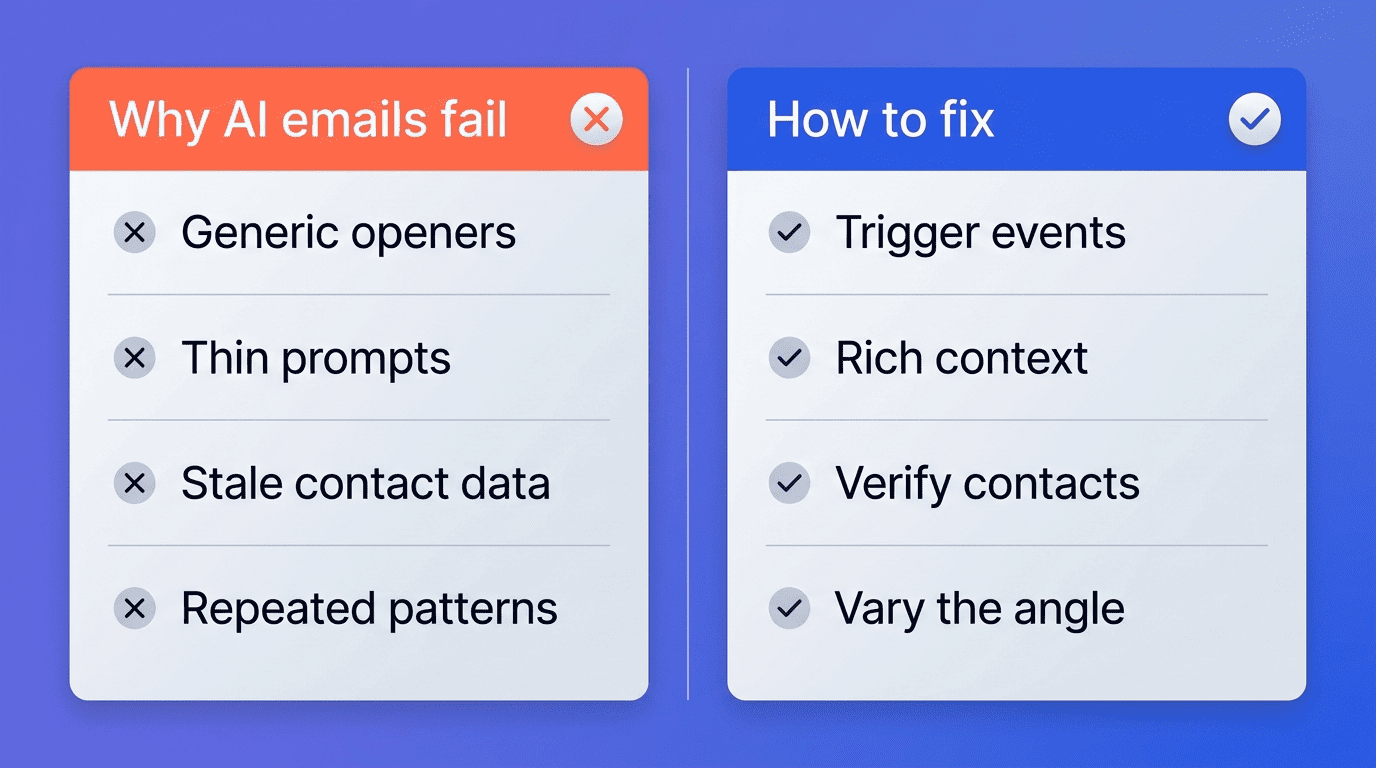
Why Most AI Sales Emails Fail — and How to Fix It
Most complaints about «AI-sounding» sales emails trace back to a handful of fixable input problems rather than the model itself.
The four failure modes
ZoomInfo identifies four recurring reasons AI-generated sales emails underperform, each with a direct fix:
- Generic openers give away the template. Anchor every first line to a real trigger event instead of a company-agnostic hook.
- Thin prompts produce thin personalization. Add the prospect’s role, company size, recent activity, and specific pain point to the prompt, not just their name.
- Stale contact data wastes the draft. Verify emails and titles before generating — the AI can’t compensate for wrong information.
- Repeated copy patterns get flagged. Vary sentence structure and angle across touches in the same sequence so it doesn’t read as one template with swapped names.
The high-converting prompt framework
A prompt that reliably produces usable drafts combines five elements: prospect context (role, company size, industry, recent activity), a specific pain point, your value proposition, a defined tone, and a concrete call to action. Editing the draft before sending is non-negotiable — treat the AI output as a strong first pass, not a finished email.
Free vs. Paid AI Sales Email Generators
Most reps can start testing personalization with a free tier before deciding whether the paid features are worth the upgrade.
Free plans cover occasional use and testing. QuillBot’s generator is free with no account required, Copy.ai offers a forever-free tier at roughly 2,000 words a month, and HubSpot has run a free beta of its email copy generator. That’s enough volume for a handful of one-off emails or trying the workflow before committing a team to it.
Paid tiers earn their cost through integration and scale. For a team running real outbound volume rather than occasional emails, upgrading typically unlocks:
- CRM integrations with platforms like Salesforce, HubSpot, and Slack.
- Automated multi-step sequences instead of one email at a time.
- Pipeline-level analytics on open, reply, and conversion rates.
- A volume ceiling well above what a free plan allows.
Copy.ai also carries SOC 2 Type II certification on its paid tiers, which matters for teams pushing prospect data through the tool. For most teams, that’s where the AI-powered email generator pays for itself in saved rep hours.
| Free | Paid | |
|---|---|---|
| Typical limit | ~2,000 words/mo or no-signup single use | Volume-based, team seats |
| CRM integration | Rare or manual copy/paste | Salesforce, HubSpot, Slack |
| Sequences | Single email only | Multi-step automated sequences |
| Analytics | None | Pipeline-level reporting |
| Best for | Testing, occasional emails | Teams with active outbound volume |
Whichever tier you start on, the same AI email generator tool logic applies — the draft is only as strong as the data and prompt you feed it.