
AI Follow-Up Email Generator: When and How to Follow Up (and Get a Reply)
An AI email generator built for follow-ups turns the context of a stalled thread — a cold email with no reply, a meeting, or a job interview — into a polite, ready-to-send follow-up in seconds. Research on lead response time has found that replying to a lead within the first hour dramatically improves the odds of qualifying it, which is exactly the kind of window a fast draft tool helps you hit. It drafts the nudge for you, so the hard parts — timing and tone — are all that’s left to get right.

Follow-ups are where most replies actually come from, yet nearly half of professionals never send one. This guide covers what these tools do, when to send, how many to send, and how to make each one land.
What Is an AI Follow-Up Email Generator?
An AI follow-up email generator is a tool that takes a short brief — who you’re writing to, what the last email or meeting was about, and what you want to happen next — and produces a complete follow-up email using a large language model (LLM), usually GPT-4 or a comparable model behind ChatGPT. Instead of staring at a blank reply box and wondering how to phrase a nudge without sounding pushy, you feed the tool the context and get a draft back immediately.
How it works: context in, follow-up out
The mechanics are consistent across most tools on the market. You give the generator a recipient’s name, the topic of the previous message or meeting, and a few key points to reference, and the LLM assembles a coherent follow-up email around that context. A typical brief includes:
- The recipient’s name and role
- What the last email, meeting, or interview covered
- Any new information or value to add
- The outcome you want (a reply, a booked call, a decision)
Easy-Peasy.AI, for example, runs on several AI models including GPT-4, supports more than 40 languages, and ships with over 200 templates covering different scenarios. Quillbot goes a step further and doesn’t just write one email — it can build an entire follow-up sequence in one pass. Claap, now part of lemlist after an acquisition, pulls context directly from a meeting transcript and writes the follow-up in the tone of that specific conversation, rather than from a generic prompt.
Tone and personalization controls
Most generators let you pick a tone before generating the draft. Mailmodo offers a straightforward Formal, Informal, or Neutral selector, while Easy-Peasy.AI pairs a tone selector with up to five alternate versions of the same email so you can compare phrasing. Personalization pulled from the context you supply — a name, a specific detail from the meeting, a shared reference point — tends to raise reply rates compared to a generic template. That said, always double-check a few things before hitting send:
- Names and titles are spelled correctly
- Dates and figures referenced actually match what happened
- The tone fits the relationship, not just the scenario
- No detail was invented to fill a gap in your brief
A model can occasionally fill gaps with plausible-sounding details that aren’t accurate, so this quick pass matters more than it seems.
What Kind of Follow-Up Are You Sending?
Not every follow-up serves the same purpose, and a good AI follow-up email writer adjusts its output based on which scenario you’re in.
The common follow-up scenarios
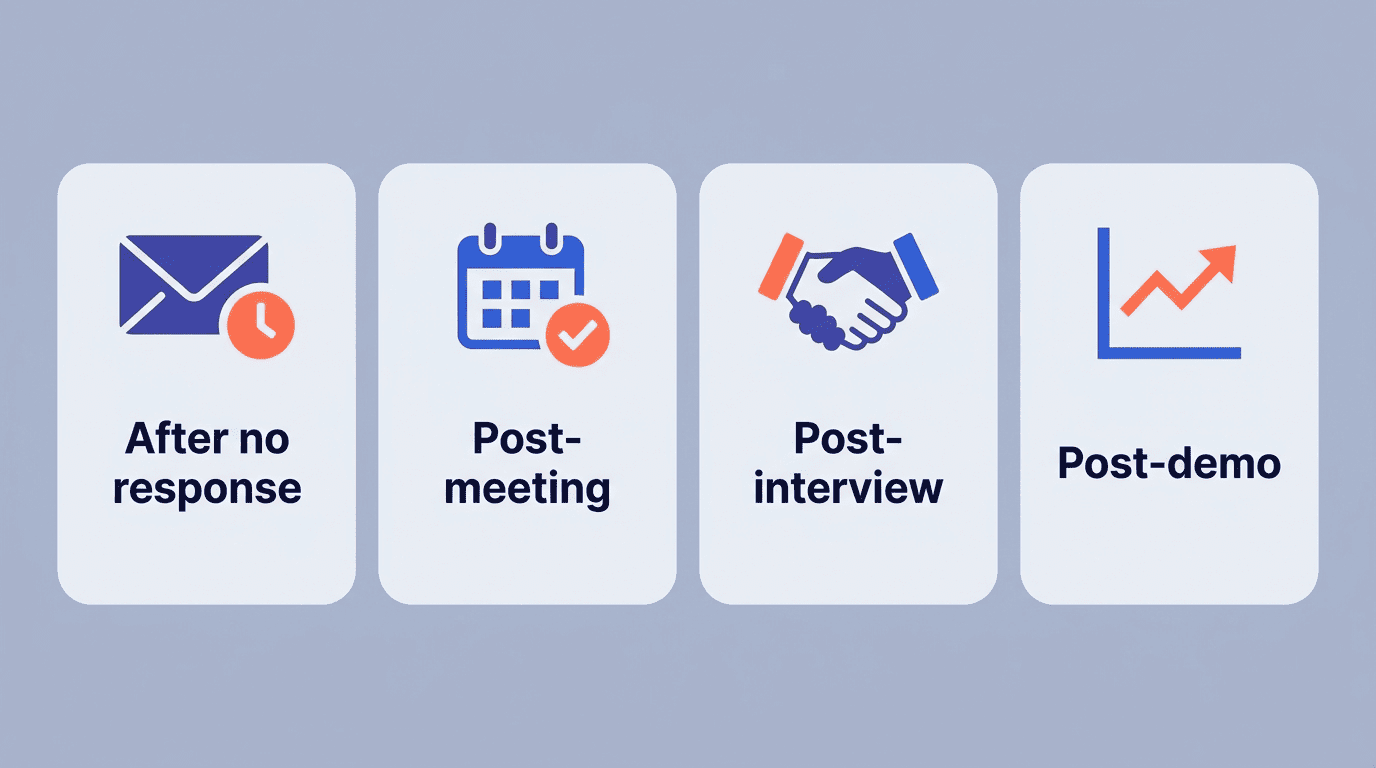
Four scenarios cover most real-world use cases. After no response is the classic cold outreach or sales follow-up where the prospect never replied to the first message. Post-meeting follow-ups summarize what was discussed and lay out next steps. Post-interview follow-ups thank the interviewer and reaffirm interest in the role. Post-demo or post-proposal follow-ups push the conversation toward a decision. The stakes of getting this right are real: industry surveys put the share of decision-makers who say they appreciate a follow-up email at roughly 48%, yet an estimated 70% of sales reps send a single email and never follow up at all.
Match the message to the moment
| Scenario | Goal | Tone | Typical timing |
|---|---|---|---|
| No response | Gentle nudge, re-open the thread | Casual, low-pressure | 2-3 business days |
| Post-interview | Thank you + reaffirm interest | Formal | Within 24 hours |
| Post-meeting | Recap + next steps | Neutral, professional | 24-48 hours |
| Post-demo/proposal | Move toward a decision | Neutral, direct | 24-48 hours |
A well-built follow-up email generator online adapts tone and structure to whichever row you’re in, rather than outputting the same generic template regardless of context.
When to Send: Follow-Up Timing
Timing is arguably more important than wording — a perfectly written follow-up sent at the wrong moment still gets ignored.
How long to wait
For a first follow-up after no response, waiting 2-3 business days (roughly 48-72 hours) hits the sweet spot: it gives the recipient enough time to reply on their own while the original topic is still fresh in their inbox. After a meeting or a product demo, the window tightens to 24-48 hours, since the details of the conversation fade quickly and a prompt recap keeps momentum. For any follow-ups after the first one in a sequence, spacing them 2-3 days apart works better than emailing daily, which reads as pressure rather than persistence.
Speed matters for inbound
The timing math flips for inbound leads — people who reached out to you first. A widely cited audit of more than 2,000 companies found that responding within the first hour makes a lead roughly 7 times more likely to be successfully qualified compared to waiting longer. Beyond the first-hour rule, data on open rates points to a best send window of roughly 9:30-11:30 AM in the recipient’s local time zone, when inboxes are freshest and attention hasn’t yet fragmented across the rest of the day.
How Many Follow-Ups: Building a Cadence
A single follow-up email already changes the math substantially, and a full cadence changes it further.
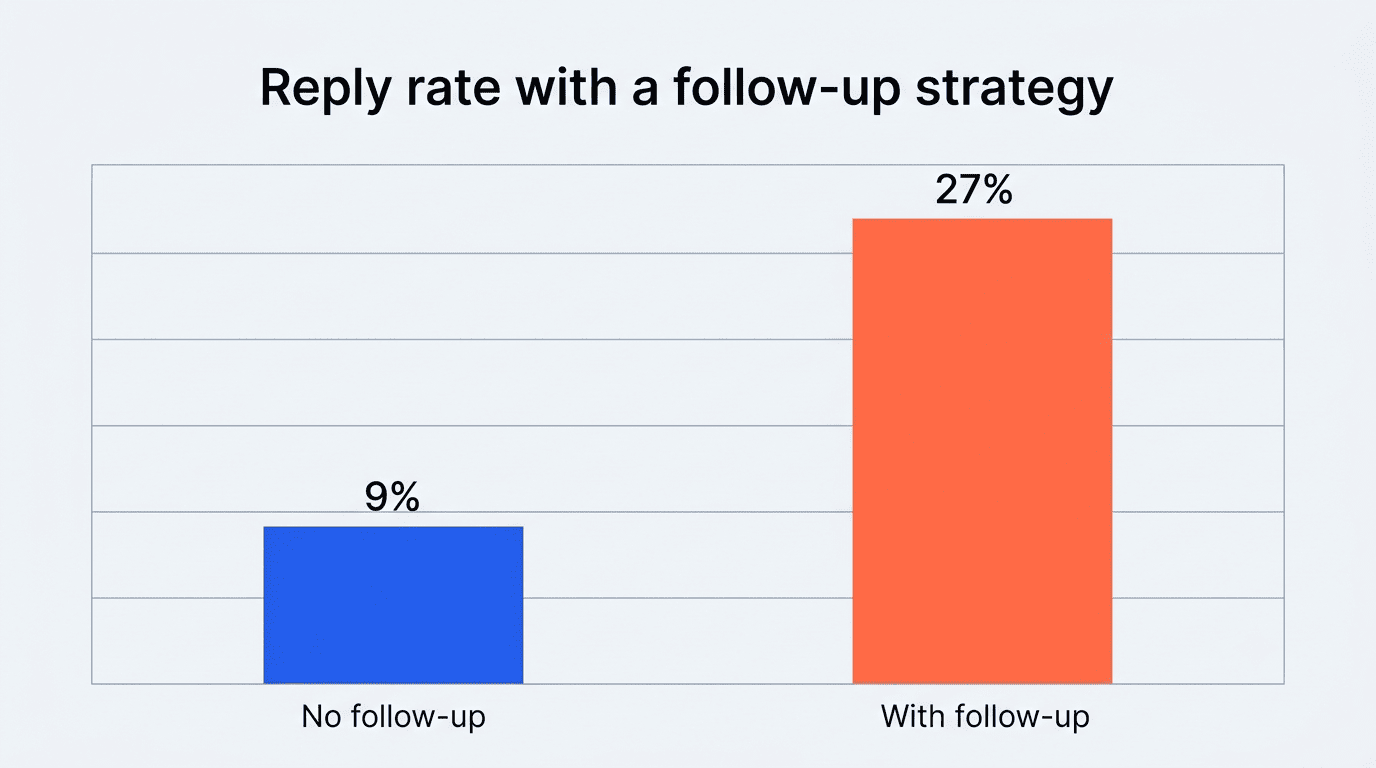
One follow-up already moves the needle. Backlinko’s analysis of 12 million outreach emails found that sending just one follow-up increased reply rates by 65.8% compared to sending a single email and stopping. Other benchmarks show a similar jump: adding a follow-up strategy can lift reply rates from roughly 9% with no follow-up plan to around 27% with one in place. Despite that, close to half of salespeople never send even one follow-up email, leaving a substantial share of replies on the table.
Most of the important things in the world have been accomplished by people who have kept on trying when there seemed to be no hope at all.
Dale Carnegie
Reply rate is exactly the kind of metric that exposes how much is lost by skipping the follow-up step. Building the second touch in with an AI email writer rather than skipping it is one of the simplest wins available.
The optimal sequence length
Most guidance converges on 4-7 touches as the optimal length for a follow-up sequence. A widely repeated stat claims that 80% of sales require 5 or more follow-ups — it circulates across sales blogs and CRM vendors like Salesforce, but treat the specific figure with some caution, since the original source is difficult to trace back to a primary study, so it’s best read as an industry rule of thumb rather than a verified data point. Directionally it still lines up with the broader pattern that persistence pays off up to a point. Beyond 7 touches, returns diminish quickly and the risk of being flagged as spam rises. This is where an AI follow-up email generator earns its keep: instead of manually drafting each touch in the sequence, the tool can generate the full cadence — email 1, 2, 3, and beyond — in one session, each building on the last without repeating the same phrasing.
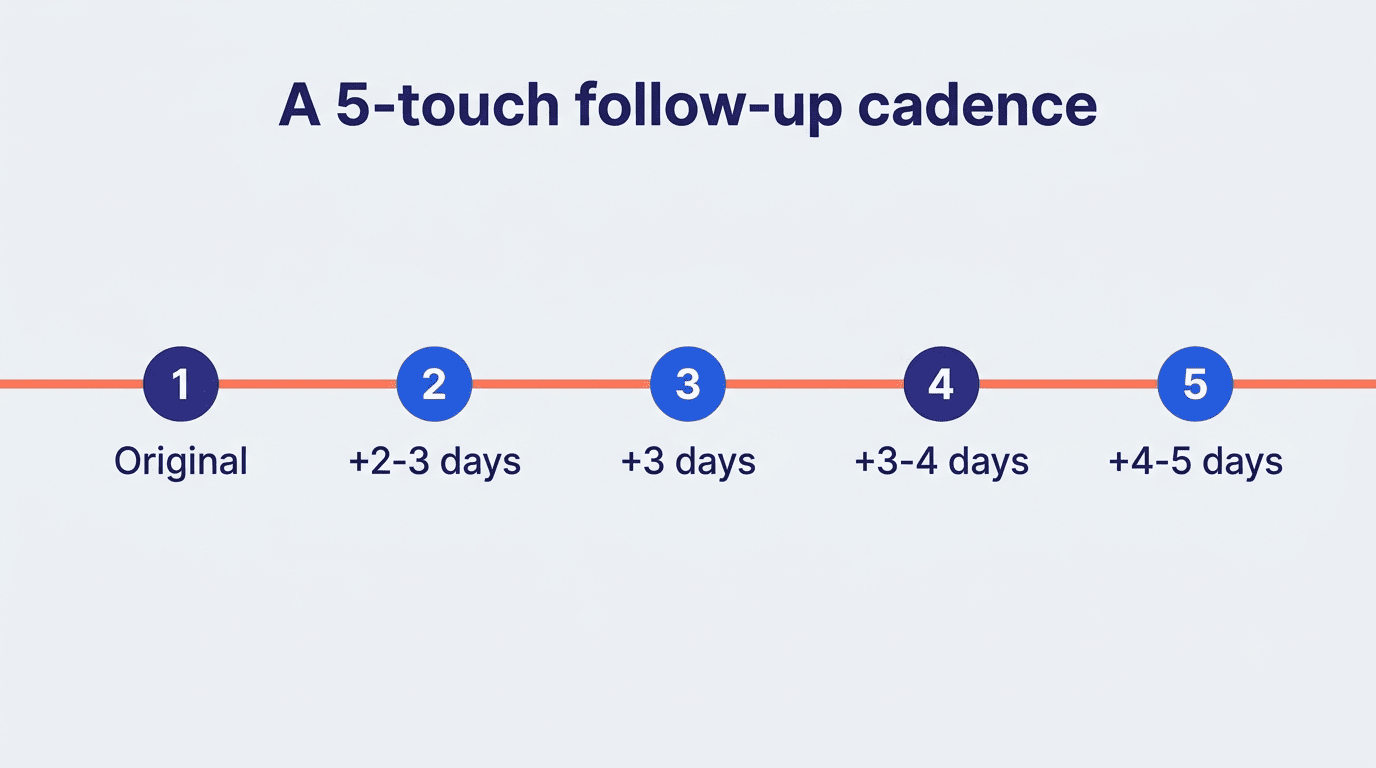
A rough cadence for a 5-touch sequence looks like this:
| Touch | Days after previous | Goal |
|---|---|---|
| 1 (original) | — | Introduce the ask |
| 2 | 2-3 days | Gentle nudge, add value |
| 3 | 3 days | New angle or resource |
| 4 | 3-4 days | Direct, low-pressure close |
| 5 | 4-5 days | Final «break-up» email |
Here’s a simple way to plan a cadence before generating it:
- Define the goal of the sequence — a reply, a meeting booked, or a signed proposal.
- Map each touch to a scenario (no response, post-meeting, post-demo).
- Assign a timing gap to each touch — 48-72 hours for the first, 2-3 days for the rest.
- Give the generator context for each touch: what changed, what’s new to add.
- Set the tone per touch — often softer at first, more direct by the final email.
- Generate drafts for the full sequence rather than one at a time.
- Edit each draft for accuracy before scheduling it to send.
How to Write a Follow-Up That Converts
Structure and a single clear ask matter more than clever phrasing.
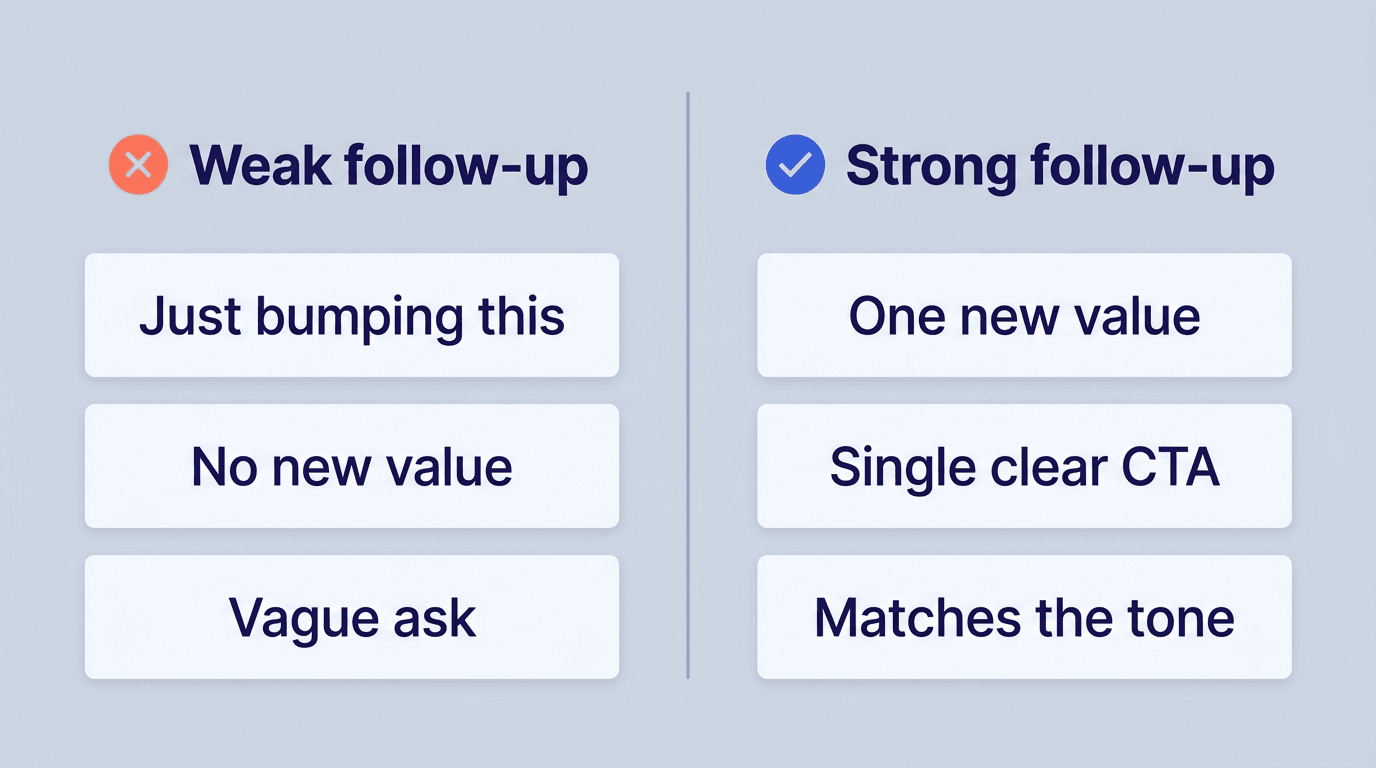
Keep the thread short and add one new thing. A strong follow-up briefly references the prior email or meeting, adds exactly one new piece of value — a relevant case study, a helpful resource, or a direct answer to an objection the recipient raised — and closes with a single, unambiguous call to action. Email marketing benchmark data shows that messages with a single call to action generate as much as 371% more clicks than messages asking for multiple things at once. A follow-up that converts usually includes:
- A one-line reference to the previous email or meeting
- One new piece of value, not a repeat of the first message
- A single, specific call to action
- A tone that matches the scenario and the relationship
Skip the «just bumping this to the top of your inbox» line; it adds no value and signals that the sender has nothing new to say.
Let AI draft, but you edit. A follow-up email generator produces a polite, non-pushy draft quickly, which is most of the battle. But because the model works from the context you provide, it can occasionally guess at details you didn’t specify. Review names, dates, and any claims before sending, and adjust tone slightly for the specific person you’re writing to. Running the draft through an AI email generator online still saves the bulk of the time a fully manual email would take, without sacrificing accuracy.